-
How-to guides
- 📥 Install borgmatic
- 📋 Set up backups
- 🗂️ Make per-application backups
- 🔒 Provide your passwords
- ☁️ Make backups redundant
- 📏 Deal with very large backups
- 🔎 Inspect your backups
- 🚨 Monitor your backups
- 📤 Extract a backup
- 🗄️ Backup your databases
- 📸 Snapshot your filesystems
- 🧹 Add preparation and cleanup steps
- 💾 Backup to a removable drive/server
- 🔧 Run arbitrary Borg commands
- 💥 Customize warnings/errors
- 📦 Upgrade borgmatic/Borg
- 🏗️ Develop on borgmatic
-
Reference guides
- ⚙️ Configuration
- 💻 Command-line
- 🐍 Source code
By default, borgmatic runs proceed silently except in the case of warnings or errors. But if you'd like to to get additional information about the progress of the backup as it proceeds, see the logging documentation for details.
Backup summary
If you're less concerned with progress during a backup, and you only want to see the summary of archive statistics at the end, use the stats option when performing a backup:
borgmatic --statsExisting backups
borgmatic provides convenient actions for Borg's
list and
info
functionality:
borgmatic list
borgmatic info
You can change the output format of borgmatic list by specifying your own
with --format. Refer to the borg list --format
documentation
for available values.
New in version 1.9.0 There are
also repo-list and repo-info actions for displaying repository information
with Borg 2.x:
borgmatic repo-list
borgmatic repo-info
See the borgmatic command-line reference for more information.
Searching for a file
New in version 1.6.3 Let's say
you've accidentally deleted a file and want to find the backup archive(s)
containing it. borgmatic list provides a --find flag for exactly this
purpose. For instance, if you're looking for a foo.txt:
borgmatic list --find foo.txtThis lists your archives and indicate those with files matching *foo.txt*
anywhere in the archive. The --find parameter can alternatively be a Borg
pattern.
To limit the archives searched, use the standard list parameters for
filtering archives such as --last, --archive, --match-archives, etc. For
example, to search only the last five archives:
borgmatic list --find foo.txt --last 5Listing database dumps
If you've enabled borgmatic's database hooks, you can list backed up database dumps via borgmatic. For example:
borgmatic list --archive latest --find *borgmatic/*_databasesThis gives you a listing of all database dump files contained in the latest archive, complete with file sizes.
New in borgmatic version
1.9.0Database dump files are stored at /borgmatic within a backup
archive, regardless of the user who performs the backup. (Note that Borg
doesn't store the leading /.)
With Borg version 1.2 and earlierDatabase dump files are stored at a path dependent on the runtime directory in use at the time the archive was created, as Borg 1.2 and earlier do not support path rewriting.
Prior to borgmatic version
1.9.0Database dump files were instead stored at ~/.borgmatic within
the backup archive (where ~ was expanded to the home directory of the user
who performed the backup). This applied with all versions of Borg.
Logging
By default, borgmatic only logs to the console. But to enable simultaneous syslog or file logging, see the logging documentation for details.
Finding differences between two archives
New in borgmatic version 2.1.3You can compare differences between two archives. For example:
borgmatic diff --archive latest --second-archive host-2023-01-02T04:06:07.080910This shows the differences (file contents, user/group/mode) between the latest archive and the second one supplied.
Note that, by default, borgmatic diff compares everything in the archives; that
is, patterns are not taken into consideration. If you require this, supply the
--only-patterns flag.
See the Borg documentation for information on output format, what is compared, and more.
Browsing backups
New in version 2.1.6 Experimental feature borgmatic has an experimental console UI for browsing your repositories, archives, and files. Here's what it looks like:
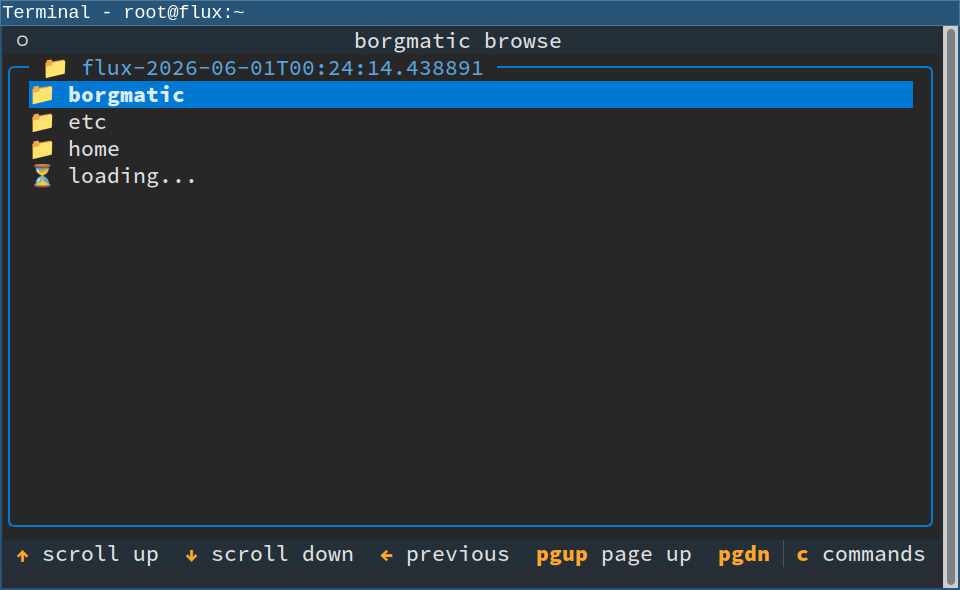
This feature is not intended to be a general-purpose Borg UI with every borgmatic feature, but rather it's for use cases like quickly looking at the contents of your backups when you're feeling too lazy to type out a full borgmatic command-line.
Depending on how you installed borgmatic, it may not have come with the necessary Python libraries to support the browse action. (borgmatic's stand-alone binary does not currently include them.) If you originally installed borgmatic with uv, run the following to install the libraries needed for the browse action:
sudo uv tool install borgmatic[browse]Omit sudo if borgmatic is installed as a non-root user.
Once the libraries are installed, run the following to access the browse action:
borgmatic browseThis launches a console UI where you can select a borgmatic configuration file (if there's more than one), select a Borg repository, select an archive in that repository, and even browse the backed up files in that archive.
Use the keyboard or the mouse to navigate the UI. The footer at the bottom of the screen shows some of the available keys. Logs show up directly in the UI at the selected verbosity, although logs are hidden by default.
Please provide feedback if you find this feature useful—or even if you don't, but would like it to become useful.
Improve this documentation
Have an idea on how to make this documentation even better? Use our issue tracker to send your feedback!